


Visual Studio Code extension · Beta
Task Runner
Your tasks and commands as a grid of big buttons, one click away.
Install from the MarketplaceGitHub
At a glance
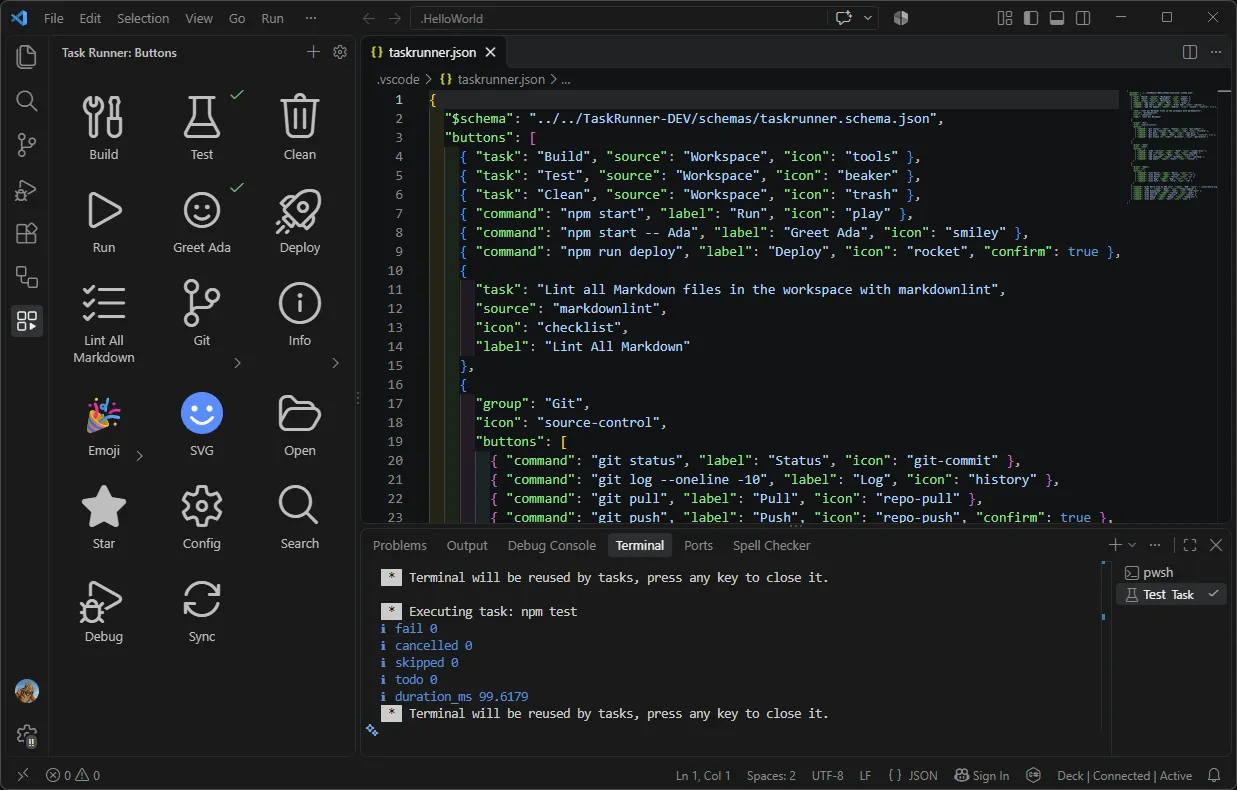
Task Runner adds a sidebar view to VS Code with a grid of big, labelled buttons. Each one runs a task from tasks.json, a task from any provider, or a plain shell command, so the things you run all day are one click away instead of buried in Terminal > Run Task or your shell history.
Screenshot
Features
- One-click buttons
- Each button runs a task from tasks.json (or any task provider, such as npm) or a plain shell command.
- Big, readable icons
- Icons range from 32 to 128 px, with optional labels underneath.
- Flexible icons
- Use a Codicon name, a workspace image (SVG or PNG) or an emoji.
- Groups
- Nest buttons in folder-like groups to keep the grid tidy.
- Run status
- A check mark shows on buttons whose last run succeeded.
- Confirm before running
- Mark deploy-style buttons with "confirm": true and Task Runner asks first.
- Edit in the UI or the file
- Add, rename, re-icon, remove and drag to reorder buttons, or edit the plain JSON file by hand. Your comments are kept when the extension edits it.
- Schema and completion
- .vscode/taskrunner.json is validated against a bundled JSON schema.
Getting started
- Click the Task Runner icon in the activity bar.
- Click + in the view title to add tasks or commands to the grid, or run Task Runner: Pick Tasks for the Grid from the Command Palette to choose from your existing tasks.
- Click the gear icon to open .vscode/taskrunner.json and edit the buttons by hand. If it doesn’t exist yet, run Task Runner: Create Config.
Configuration
Buttons live in .vscode/taskrunner.json, in the order shown. A button has exactly one of task, command, or group with buttons, plus optional label, icon, tooltip and confirm. Commands also take cwd, env and shell.
{
  "buttons": [
    // Run a task from tasks.json
    { "task": "Build", "source": "Workspace", "icon": "tools" },

    // Run a shell command
    { "command": "npm start", "label": "Run", "icon": "play" },

    // Ask first
    { "command": "npm run deploy", "label": "Deploy", "icon": "rocket", "confirm": true },

    // A group of buttons
    {
      "group": "Git",
      "icon": "source-control",
      "buttons": [
        { "command": "git status", "label": "Status", "icon": "git-commit" },
        { "command": "git push", "label": "Push", "icon": "repo-push", "confirm": true }
      ]
    }
  ]
}
The settings taskRunner.iconSize (32 to 128), taskRunner.showLabels and taskRunner.columns (1 to 12, or auto) tune the grid. The full list of button properties and commands is in the README on GitHub.
Requirements and licence
Visual Studio Code 1.90 or later. Task Runner has limited support in untrusted workspaces: the buttons are shown, but nothing runs and icons from workspace files aren’t loaded until you trust the folder. It is open source under the MIT licence.